Go LSP for Micro
Three Line Install for Language Server Protocol Plugin
Coding in Go, with Micro editor? See function signature (alt-k), definition (alt-d) and references (alt-r).
You can now install language server support in three commands
$
$
$
That solved it for Debian 11-Bullseye. Installation on non-Debian systems is similar, you'll just need 'gopls' in your path, then 'micro --plugin install lsp'.
Trying it out # ↑
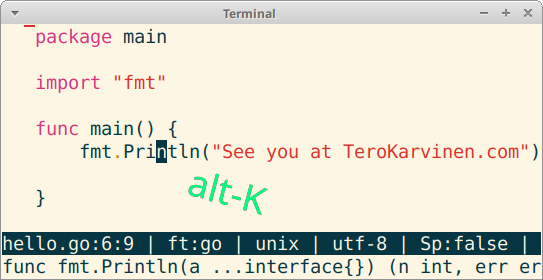
Write Go Hello world
$
package main
Move cursor over Println. Press Alt-K. Function signature is shown at the bottom status bar.
Function signature looks something like this: "func fmt.Println(a ...interface{}) (n int, err error)Println formats using the default formats for its operands..."
Do you see the function signature? Well done, you've installed LSP support for Micro.
What Next # ↑
Try
- Alt-D (definition)
- Alt-R (references).
Use my Micro Jump plugin to move between your own functions.
See also # ↑
Micro editor LSP support for Python and Go
Python LSP support is detailed in AndCake/micro-plugin-lsp/help/lsp.md
Official homepage for LSP plugin: AndCake/micro-plugin-lsp
LSP support is discussed in Micro issues Feature Request: Add support for Language Server Protocol servers #1138 and Auto completion #174.
Adminstrivia # ↑
This article has been updated after publishing.