Micro editor LSP support for Python and Go
Jump to definition - Show function signature
Install Language Server Protocol (LSP) support for Micro editor
- Show function signature (Alt-K)
- Jump to function definition (Alt-D)
- Find references (Alt-R) (new!)
- Show tips for wrong types in the gutter
- All without leaving your terminal, in Micro editor
Update: It's now a three line install for Go support. 'sudo apt-get update; sudo apt-get install gopls micro golang-go; micro --plugin install lsp'. And it also supports find references (alt-R)
Update: LSP plugin is now published. Just 'micro --plugin install lsp' and add two lines to settings.json.
When I press Alt-D, the function signature is shown on the bottom status bar:
It was very easy to get Go features working. Python required some digging, but here is a ready made solution.
Tested on Debian # ↑
These commands have been tested on Debian 11-Bullseye, but they'll likely also work on other Debian based distros like Kali, Raspbian or Ubuntu.
AndCake's plugin is still beta. Thus, installing LSP support to micro is likely to get simpler in the future.
Even though I have created other ways of using LSP with micro in the past, the plugin used here is written by AndCake, not me.
Install micro-editor # ↑
$
$
Bash-completion is just for convenience, to make tab auto-complete commands on bash command line.
$
Let's make some basic settings. Inside micro editor, press Ctrl-E to use micro's command bar. Tab completes partial commands and settings in command bar.
ctrl-E> set colorscheme simple
ctrl-E> set tabstospaces false
ctrl-E> set ftoptions false # dont force-disable tabs on Python files
Micro uses familiar commands, so Ctrl-S to save and Ctrl-Q to quit.
This also created the config file we can edit later
$
{
"colorscheme": "simple",
"ftoptions": false
}
If you're using 'tmux', the terminal multiplexer, use the correct TERM setting to allow selecting with Shift-Arrows.
$
Install AndCake's micro-plugin-lsp # ↑
We'll install AndCake's LSP plugin using git. As of 2022-04-03 w13 Sun, it's not yet available trough the standard mechanism 'micro --plugin install micro-plugin-lsp'.
Download the LSP plugin
$
$
$
Enable it in settings. When micro opens its own settings, it warns that file has changed on disk, reload? Say "y" for yes.
$
- We added a comma at the end of line 3.
- On line 4, we disabled automatic formatting on save. Formatting can be done with Alt-F when you want, and some formating done by external tools can be really annoying. For example, with default settings the Python formatter adds double empty lines between functions. It also converts all tabs to spaces, which might not be your fancy.
- On line 5, we're using pylsp (with "p" at the end). This is different from current settings in AndCake's micro-plugin-lsp README. We will be using the updated, community maintained project, not the original Palantir version.
Install Go Support using GoPLS language server # ↑
$
Let's try it out.
Try Go # ↑
$
Write the regular hello world in Go.
package main
Show Function Signature - Alt-K # ↑
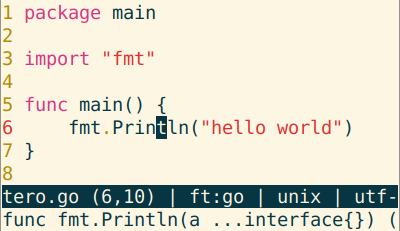
Move cursor over Println and press Alt-K. Function signature is displayed at the bottom of the screen.
Jump to Definition - Alt-D # ↑
Keep cursor over Println and press Alt-D. The file defining fmt.Println opens in a new micro tab. This file comes from Go built-in libraries. Cursor is already moved to correct position. Press left or right to move view to correct place.
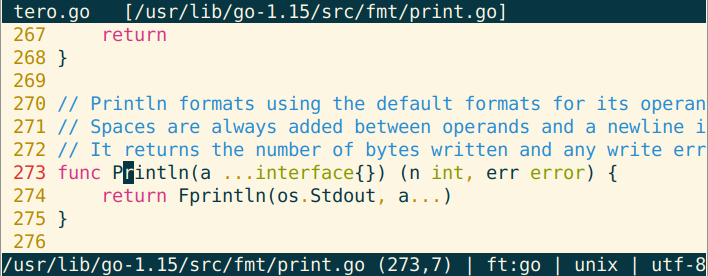
To move between tabs in micro, press alt-, (alt-comma) or alt-. (alt-dot). To close a tab, press Ctrl-Q.
Bonus: Go-plugin - gofmt # ↑
Go plugin has worked for a long time. It does not use LSP.
$
$
It allows you to quickly format your code.
$
Add some unnecessary tabs before "package main".
Ctrl-E> gofmt
Formating is quicly corrected to goformat style.
Additional go plugin features not discussed here include goimports and gorename.
Well done, now you have nice Go support in Micro
- Show function signature Alt-K
- Jump to definition Alt-D
- Format code Ctrl-E gofmt
Install Python support using PyLsp language server # ↑
Currently, Python LSP support requires installing packages with pip. Hopefully, in the future the packages become available with apt-get, from standard Debian repositories.
Let's create a new virtualenv to keep Python packages in one place
$
$ ;
$
$
In the prompt, "(env)" shows that we're now using the virtual environment. Let's install what we need. Also, let's not install anything annoying.
$
Add contents to requirements.txt. I've hand picked what's installed with python-lsp-server, so that it does not annoyingly demand you to add two empty lines between functions, but does complain about real problems. Mypy can optionally warn you about incorrect types, if you mark the types in your functions.
--
-
$
After a moment, pip has installed your packages. Let's try it out!
Try Python - Linting for Mistakes # ↑
$
Write some mistaken Python. Go ahead, you've got my permission.
return
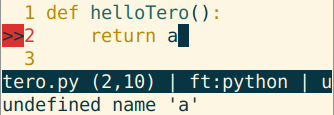
Save with Ctrl-S. Now a warning ">>" appears on the gutter. Move the cursor over the line with warning, 'return a'. Now the full warning is shown at the bottom, on the status line: "undefined name 'a'".
Show Python Function Signature - Alt-K # ↑
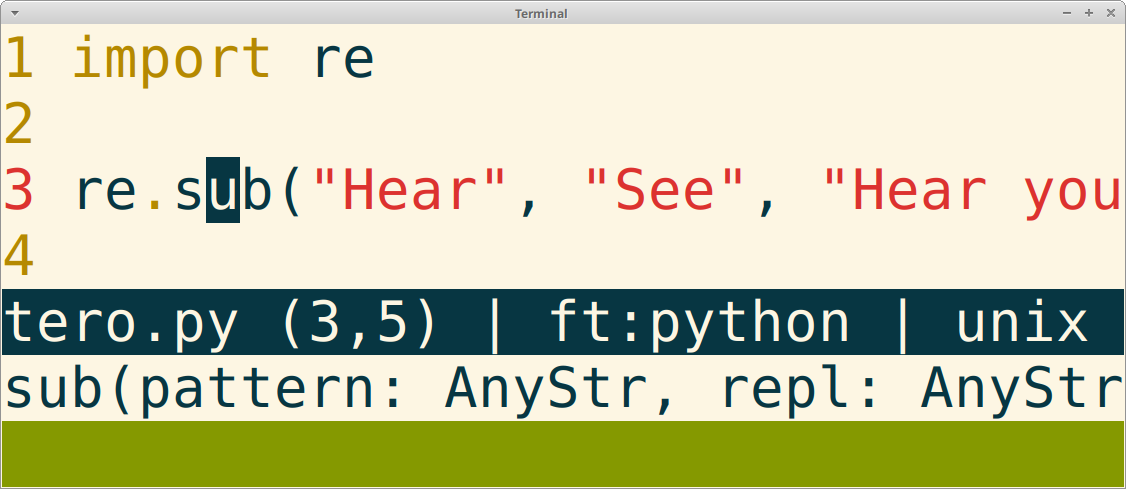
Write a sample Python program
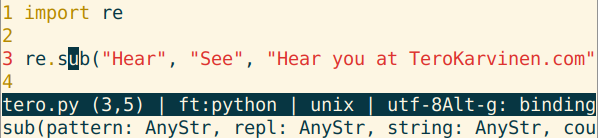
Move cursor over sub() and press Alt-K show function signature. The parameters for the function are shown in status bar at the bottom of the screen.
Note that micro does not pop helpful advice on your face while you try to write. It helps, but only when you ask with Alt-D or Alt-K.
Jump to Python Function Definition - Alt-D # ↑
On the same program, keep cursor over sub() and press Alt-D.
The file containing the function defition opens. Press left or right, so that view jumps to cursor position.
Just like we discussed before, you can use alt-. and alt-, to move between micro tabs; and Ctrl-Q to close the tab.
Using PyLsP with the P in the End # ↑
Pylsp project we use here is the current one. Instructions in AndCake/micro-plugin-lsp imply the use of palantir/python-language-server pyls (no "p" at the end). However, as of 2022-04-03 w13 Sun, Palantir project has last been updated at the end of 2020, over a year ago. A community maintained fork python-lsp/python-lsp-server has been updated four days ago. The discussion on Palantir version's bug list also gives some indication that development has moved to python-lsp/python-lsp-server we use here.
Summary # ↑
Micro now suppors LSP, the language server protocol. The support is trough an experimental plugin, but it works.
In Python and Go, you can now
- Show signature of function under cursor (Alt-K)
- Jump to function definition (Alt-D)
- See warnings about types and other mistakes, shown on the gutter
See also # ↑
zyedidia / micro: Issues: Feature Request - Add support for Language Server Protocol servers #1138
python-lsp / python-lsp-server "Fork of the python-language-server project, maintained by the Spyder IDE team and the community"
python-lsp / pylsp-mypy "Mypy plugin for the Python LSP Server."
mypy - Optional Static Typing for Python This has the examples how to mark the types.
Next - KanaSirja ks # ↑
Now that you can see how individual functions work, would you like to have the full docs offline? Checking HTML and Javascript on Mozilla Developer Network (MDN), reading Python requests quickstart or Django tutorials - all from the comfort of your terminal? Check out ks - the KanaSirja offline dictionary.
Adminstrivia # ↑
This article has been updated after publishing