tBar for LibreOffice Impress
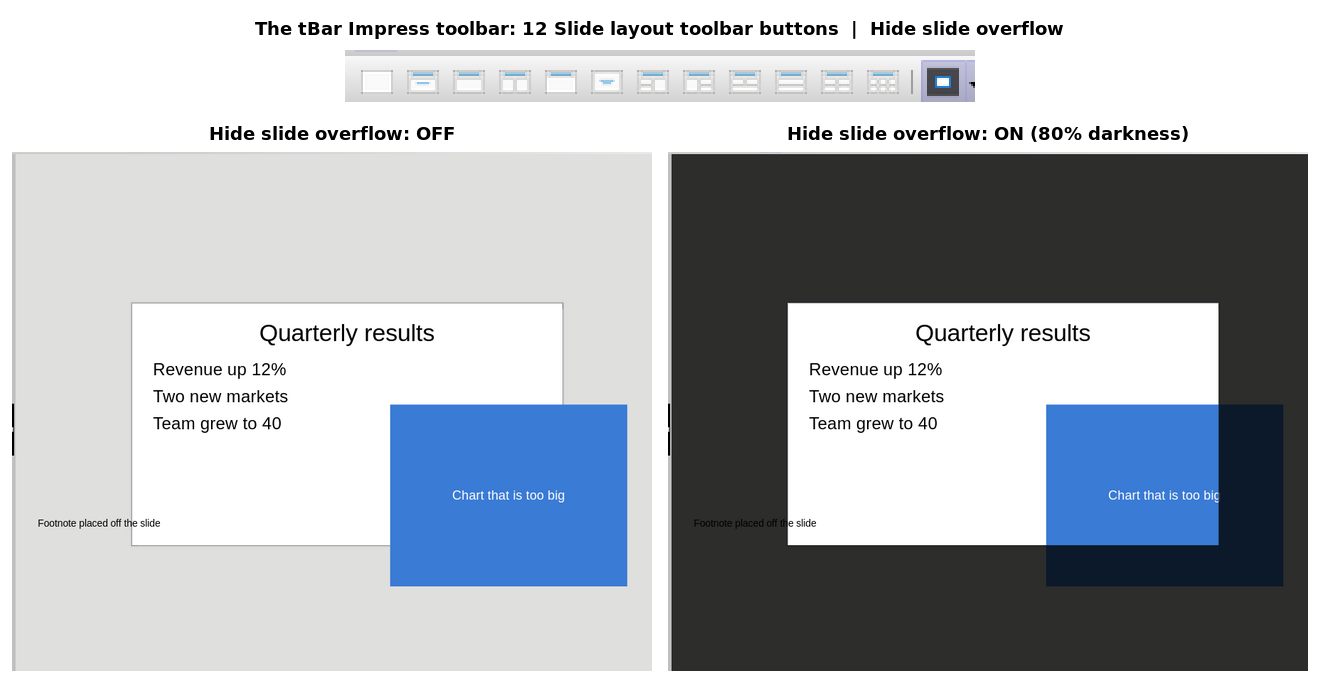
Hide slide overflow.
Change slide layout from toolbar, don't waste 10% of screen for sidebar.

An extension for LibreOffice Impress.
Download tbar-impress.oxt. LibreOffice Impress: Tools: Extensions: Add.
Hide slide overflow: Would you like to see what's actually visible on your slide? Hide slide overflow dims everything outside slide.
Slide layout: On toolbar, not sidebar. Ctrl-M for a new slide, then click the layout. Heading and bullets. Or two columns. TBar puts the layout buttons on the toolbar. By default, they are on sidebar, which takes about half a full HD display out of a 4K monitor.
Beta. Tested with LibreOffice Impress 25.2.3.2. It's the one that comes with Debian stable, 13-trixie. Or just 'sudo apt-get update; sudo apt-get install libreoffice-impress'.
Clanker rant: Created with the assistance of artificial intelligence. I also had an AI write me a README, but it was so long winded I had to do it again by hand. Even another AI instance said it's TL;DR time.
Hide overflow - what does it look like