Flask Automatic Forms
Automatically create your database and HTML forms from your model. Short, convenient, but a bit abstract. Short notes.
This is an intermediate article. If you're new to Flask, you might want to start from Hello Flask
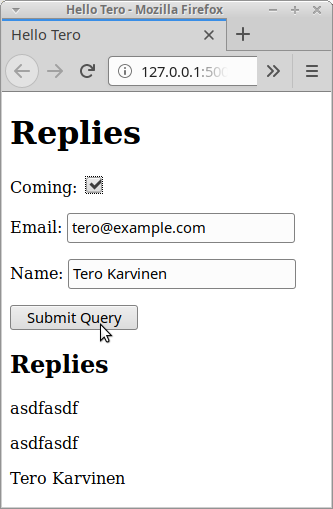
Writing HTML form can feel tedious. Luckily, WTForms can automatically:
- Generate your form (from ORM database model)
- Validate submitted from on server side
- Show user errors on form (e.g. "Not a valid email")
Caveats: These are just short code examples. For troughout explanations, read my earlier articles on Flask. This is a demonstration of creating forms automatically. For example, CSRF protecation is not tested.
autoformed.py # ↑
As the backend is abstracted with SQLAlchemy, this exact same code works with PostgreSQL just by changing SQLALCHEMY_DATABASE_URI. As there is less setup with SQLite, it's a good idea to test with that first.
When you start using the script, you should provide your own SECRET_KEY.
$
QFLl4I17MpsBebNB18nrKPP6aVnf7M
#!/usr/bin/python3
# Copyright 2020 Tero Karvinen http://TeroKarvinen.com
=
=
=
= False
=
=
=
=
=
=
=
=
=
return
=
return
templates/base.html - Base template # ↑
Joining an Event Example
{% with messages = get_flashed_messages() %}
{% if messages %}
{% for message in messages %}
{{ message }}
{% endfor %}
{% endif %}
{% endwith %}
{% block body %}
Hello Tero
{% endblock %}
Learn Flask automatic forms at TeroKarvinen.com
templates/replies.html - Form and List Template # ↑
{% extends "base.html" %}
{% block body %}
Replies
{{ form.csrf_token }}
{% for field in form if not field.name in ["csrf_token"] %}
{{ field.label }}: {{ field }} {{ " ".join(field.errors) }}
{% endfor %}
Replies
{% for reply in replies %}
{{ reply.name }}
{% endfor %}
{% endblock %}
Adminstrivia # ↑
Updated: Fixed "reply.html" -> "replies.html" filename, thanks Santtu for spotting that.
This article was tested with Ubuntu Linux 18.04 LTS.