Hello Flask - Write a Python Web App

With this article, you learn to install Python Flask and run a "Hello world" in development environment.
Benefits # ↑
Server side web app
- works with any OS (with a web browser)
- there is only one version to support
- you can see what users are doing (from web server logs)
Prerequisites: You should know Linux command line and administration, and the basics of programming in some language.
This article shows a development environment, which is not suitable for production. Commands have been tested on Ubuntu Linux, but they are likely easy to adapt to any modern Linux.
Install python3-flask # ↑
You can install Flask web framework with package manager. This is safe and convenient, as it will be updated automatically. Python 3 is installed by default.
$
$
Write Hello World # ↑
Write the code with 'nano'. Ctrl-X, Y, enter to save.
$
=
return
Run Your First App # ↑
$
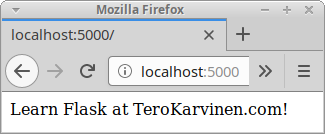
And browse to your new website http://localhost:5000
Did you see the text in your browser? You are running Python Flask!
Every Line Explained # ↑
Now that you got it working, you might want to learn how it works.
You installed Python module "flask" with 'sudo apt-get -y install python3-flask' earlier. Here, you import a single class, "Flask". The syntax "from ... import" means that Flask is in top name space, so you can write "Flask" instead of "flask.Flask".
=
Create a new object of the Flask class. Save the new object to global variable called "app".
Global means that variable "app" is available to all of your functions.
Here, app is our main application object, of class flask.Flask.
The __name__ in the Flask() constructor is always used in simple apps. The __name__ magic variable is created by Python, and here it contains the string "__name__".
For quick development, Flask contains a development server - for localhost only. It's neither suitable nor safe for public Internet or production use.
Later, you'll learn to publish your Flask app on the Internet with Apache and mod_wsgi. For such production installs, the whole app.run() line is removed.
When user browses to http://localhost:5000, the path is "/".
return
We have used "@app.route("/")" decorator to choose a function for this URL.
Whenever you want to make your function accessible from the web, you can use similar decorator: @app.route("/posts"). The at sign "@" means it's a decorator - a function around our function. It's just a convenience thing, and it's possible to just use Flask without knowing the ins and outs of decoretors.
Function hello() is as simple as a function can be. It takes no parameters (hence empty parenthesis), and it returns a string.
Well done. You now know your Flask development environment works (as you ran "hello world") and you know the meaning of each line.
Adminstrivia # ↑
The Flask logo is the property of its owner.
Tested on Ubuntu 18.04.1 LTS amd64, 1 GB RAM, python3 3.6.7-1~18.04.